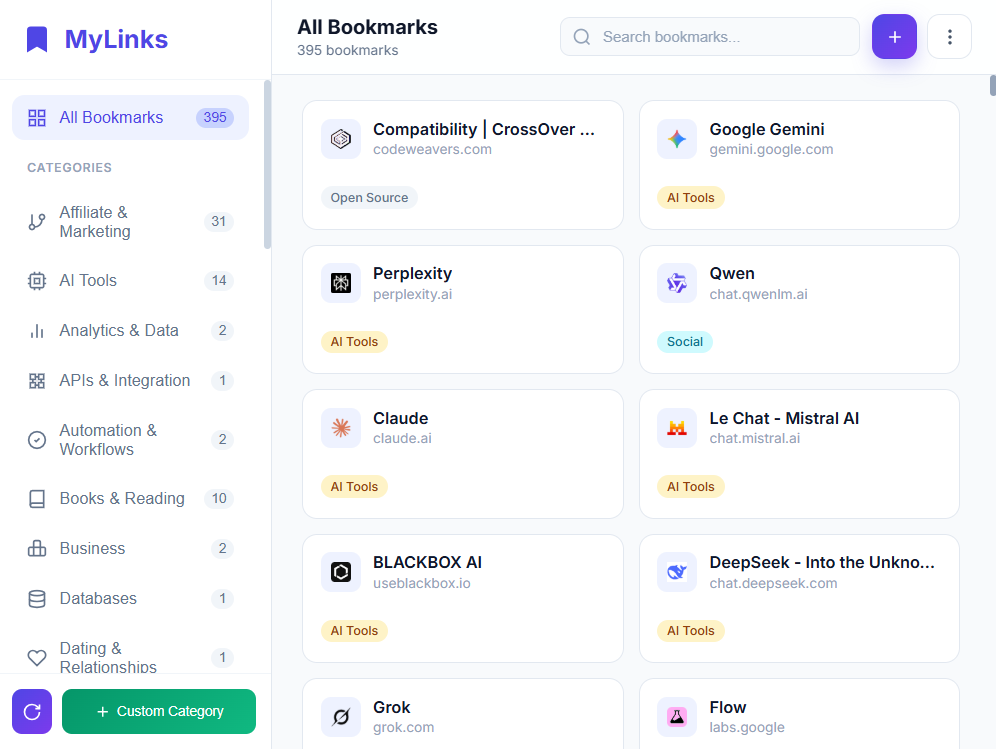
Stop scrolling through endless bookmark folders. MyLinks Dashboard automatically categorizes and displays all your bookmarks in one elegant, searchable interface.
Powerful features wrapped in a beautiful, intuitive interface.
Bookmarks are automatically sorted into 100+ categories like Development, Design, Finance, AI Tools, Gaming, Music, and more using intelligent keyword matching.
Just start typing! Find bookmarks by name, website, category, or even words from the URL. Your bookmarks, found in seconds.
All data stays on your device. No accounts, no tracking, no data collection. Your bookmarks are yours alone.
Automatically matches your system theme. Beautiful in light mode, stunning in dark mode.
Each bookmark is displayed as a card with favicon, title, and category tag. Hover to reveal quick actions.
Made changes to your bookmarks? Hit re-categorize to instantly sort everything again.
Create your own categories with custom keywords. Perfect for organizing niche bookmarks your way.
Export bookmarks as standard Chrome default HTML or beautiful HTML dashboard to share.
Add, edit, and delete bookmarks without leaving the popup. Auto-fetches title & description from URLs.
Your bookmarks, automatically organized into meaningful groups.
No configuration needed. Just install and enjoy.
Add MyLinks Dashboard to Chrome from the Chrome Web Store. It's free and takes just one click.
Click the MyLinks icon in your browser toolbar to open your beautiful bookmark dashboard.
All your bookmarks are automatically categorized and ready to search. That's it!
We believe your bookmarks are personal. That's why MyLinks Dashboard is built with privacy at its core.
Join thousands of users who've transformed their browsing experience.
Add to Chrome — It's Free Works with Chrome, Edge, Brave, and other Chromium browsers